top of page

I'm as ready as anyone to ease back toward a more normal existence. I think it can be done rather easily for a photographer with the use of some long lenses and a little PPE.

With telephoto lenses and a good tripod there's no need to get within 6 ft. of any subject. Add a face mask and eye protection and all we need is for the people around us to stay a responsible distance away. In my experience that's the difficult part. People who don't wear masks want to get close to everyone and seem not to recognize that the person wearing the mask really takes this virus seriously and fears infection. When that happens I try to be polite when I say "Please stay back." If they scoff, I've been scoffed at by the best scoffers. No problem.

ree

This is my ad aimed at meeting planners.
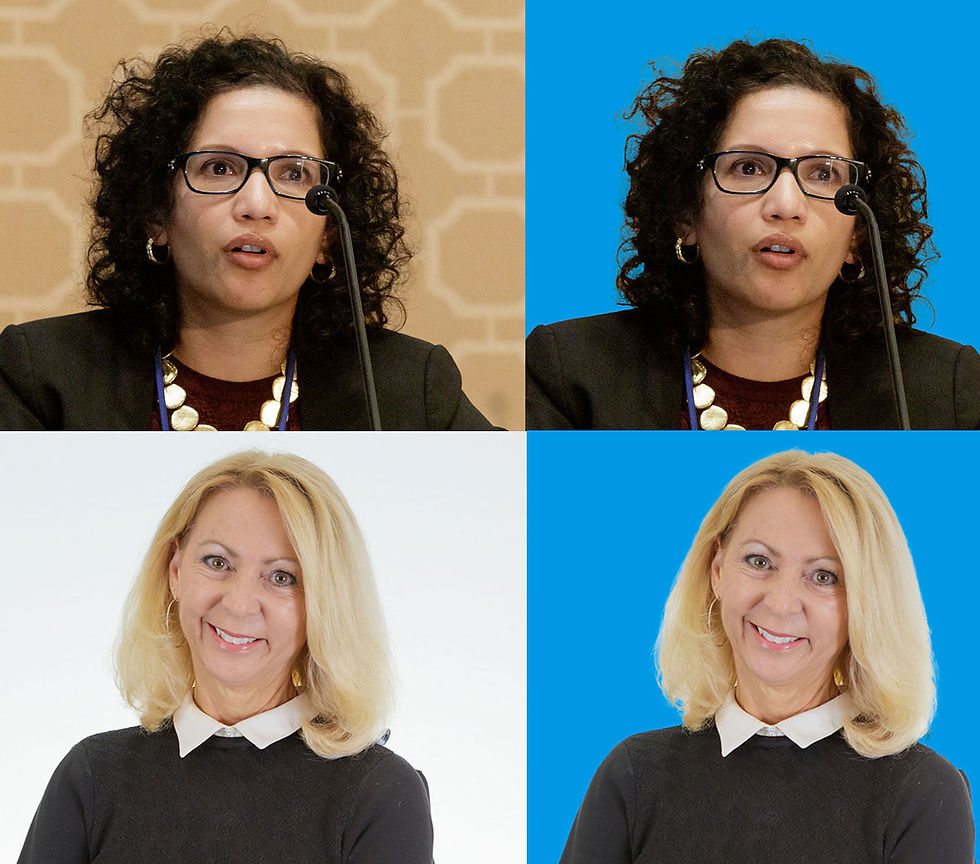


Since ancient times every photographer has struggled with separating a full head of hair, with lots of fine strands sticking out, from a background. Like many photographers, I've been using Adobe products for what seems like centuries and I've marveled at the advances they've made in making such separations. Well Erma Gerd reports that the latest update to Adobe Photoshop brings a truly giant leap for photographer-kind in separations.

Using only the "select subject" command I made the separations you see below that, last week, would've taken me 20-30 min. of trying to find the best combination of settings in "select and mask" and then settling for something that lost about 15% of the hair. Selecting a blonde head on a white background was the worst.

If you're an Adobe Photoshop user and haven't checked out this latest update, issued this week, you're in for a few moments of happiness. Pick your most challenging hair selection possibility and see what happens when you use "select subject".

ree

This selection was made using only the "select subject" command in Adobe Photoshop.


bottom of page